
The problem
An explainer video can draw a heart or a volcano however it likes. A product advert can't: the seller's customers will receive the real thing, so the advert has to show that thing, name it correctly and say only what is true of it.
ContentRoof makes a product advert from one photo. The photo is cut out and filmed close up, revealed with the product's name, and the advert ends on the seller's button. Between those moments it shows the product in everyday places (a watch on a bedside table, a kettle on a counter) in pictures generated from the photo and checked against it.
To put samples of its six advert styles on our site, we made each one the way a seller would: one photo, a short description, a style. Then we watched every frame.
Finding 1: the system named the product from how it looked
The first lint roller advert showed no lint roller at all in its pictures. The reason was in the first step. Before writing anything, the product's photo is described, so the writer and the picture generator know what it is. Looking at a black curved handle on a stone base, without being told, the description read: "a black curved plastic hair pick with a long handle".
The seller had written "a lint roller". But the description, not the seller, supplied the product's name in every picture request, so all four attempts drew a hair pick, all four failed the check against the photo, and the scene was left out. The narration had picked it up too: "The pick stands alone."
The fix is simple: when the seller has described the product, the photo is described again with their words, and their name for it wins. The same photo now reads "a lint roller with a black plastic handle and a cylindrical, speckled grey stone-look base". The seller knows what they sell.
Figure 1Generated pictures that passed the check, by product
Data
| Value | |
|---|---|
| Canvas sneakers | 6 of 6 |
| Leather bag | 6 of 6 |
| Candle holder | 12 of 13 |
| Lint roller | 15 of 21 |
Finding 2: a scene without the product showed a fake one
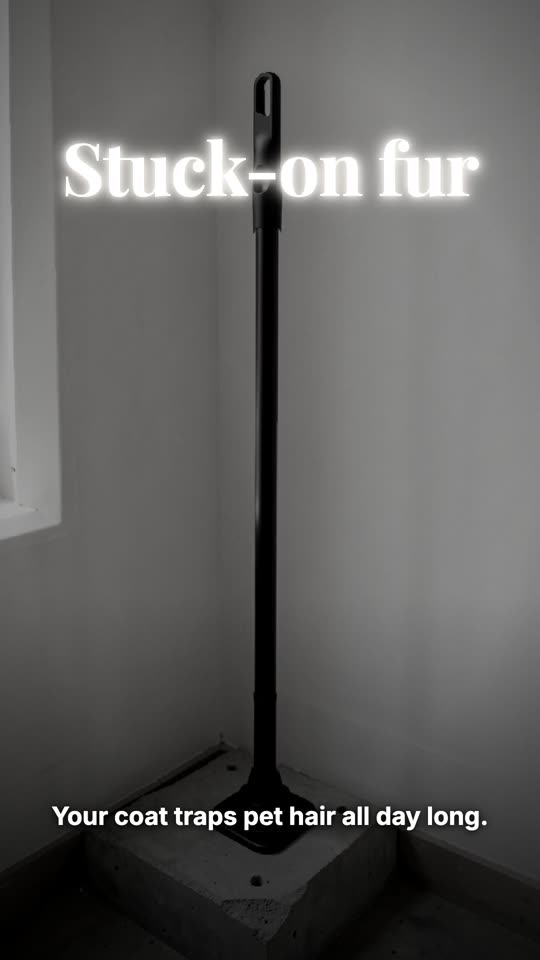
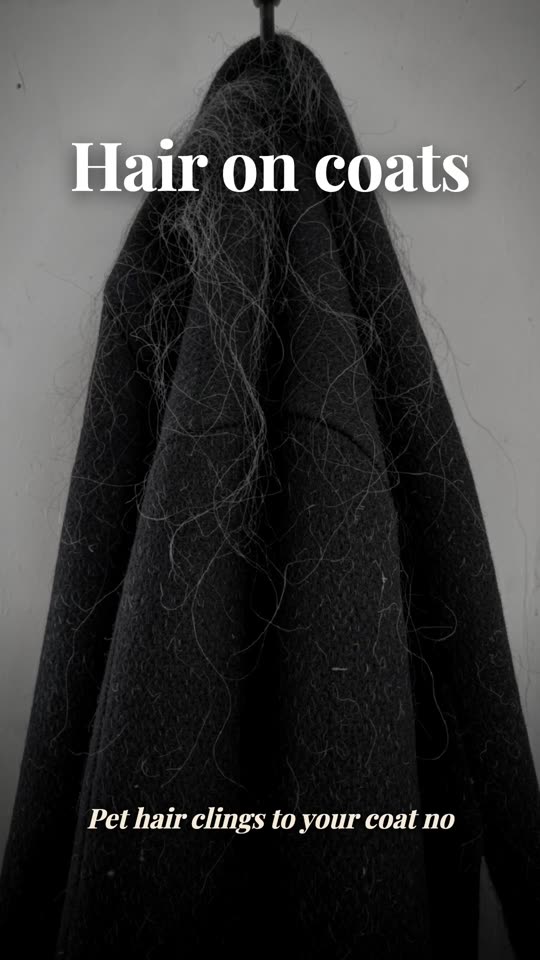
The "problem, then the fix" style opens on the everyday annoyance before the product appears: pet hair on a coat, tangled cables. That picture is generated without the seller's photo, because the product is not supposed to be in it.
The writer was told to leave the product out, but nothing enforced it, and its first opening scene described "a black lint roller stands upright on a concrete base". With no photo to follow, the generator invented one: a tall roller on a long pole (left, in the plates above). The check passed it, because the check only asked about people, writing and oddities, not about the product.
Now two separate guards stop it. The script is rejected if its problem scene names the product, and the picture is rejected if the product, or anything like it, appears in it. The opening became a black coat covered in pet hair, as it should have been.
Finding 3: capitals are wider than you think
Titles are sized so their longest line fits the frame, using an average letter width. That average was for ordinary mixed-case text. The sale advert slams its deadline onto the screen in capitals, which are much wider, so ENDS SUNDAY ran off both edges:
Figure 2A title in capitals, before and after
 A Before
 B After
Titles shown in capitals are now sized at capitals' width, with room left for the small growth they make while on screen.
Finding 4: a typeface without the letters
Each advert style has its own typefaces: a serif for warm styles, a heavy grotesque for bold ones. None of them contain Arabic, Urdu or Hindi letters. When a font lacks a letter, the browser quietly borrows one from any other font it has, and for Arabic it borrowed the Urdu Nastaliq, a calligraphic style Arabic readers don't expect for subtitles:
Figure 3An Arabic subtitle, before and after
 A Before: Urdu Nastaliq
 B After: Arabic Naskh
Each script now gets its own typeface, placed before any generic fallback, and joined scripts are never set in italics or with letter-spacing, which had pulled Hindi letters apart in the small labels.
Why there are never people in the pictures
Earlier, the generated pictures showed the product in use: a watch on a wrist, headphones on a head. Hands came out with fused fingers, a watch was tied to a shoelace, and some pictures had limbs that belonged to nobody. Worse, some of these passed every automatic check. A cheaper picture generator made two of the three pictures in one test advert wrong, and those passed the check too.
So the pictures show the product alone, in a place that tells the moment: on a bedside table, beside a bath, in a hallway. An advert with no hands in it is less vivid. An advert with a six-fingered hand holding your product loses the sale.
When the picture service says no
One product could not be pictured at all: a perfume in a square, dark glass bottle. The picture service's own safety filter refused every picture of it, in every scene and every wording we tried, most likely because it looks like a bottle of spirits. Earlier, the studio reported this as pictures that "didn't pass the quality check", which was wrong and confusing. It now says plainly that the service refused them, and close-ups of the seller's own photo take their place, so the advert still works.
How long it takes
Figure 4How long each step took
Data
| From | To | |
|---|---|---|
| Writing the script | 3.9 s | 7.9 s |
| Voice, music and pictures | 5.7 s | 76.3 s |
| Exporting the video | 35.3 s | 100 s |
On one laptop, writing an advert's script took 4 to 8 seconds, preparing the voice, the music and the checked pictures 6 to 76 seconds, and exporting it 35 to 100 seconds.
What we take from it
Make the thing the way a customer would, then watch all of it. None of these four bugs showed up in a test that checked whether an advert was produced: every one produced a finished video. They showed up only when someone looked at every frame and asked whether a seller would be happy to post it.